
















Facilities Management Software Loader

Facilities Management Software for In-House FM Teams

Reactive tickets in one inbox, PPM schedules in a spreadsheet, asset lists in someone's head — and an enterprise CAFM quote you can't justify. EyeOnTask puts work orders, planned maintenance, asset registers, SLA contracts and multi-site reports in one affordable system your team will actually use.

No credit card   •   No setup fee   •   Cancel anytime

Best Field Management Software for your Facilities Business

We serve these big league companies
Work Orders

Facilities Work Order Software That Keeps Every Request Moving

A blocked restroom, a flickering light on level 3, a door access fault — requests come from everywhere and die in email threads. Log every request as a work order in seconds, assign it to the right technician, and watch it move from raised to resolved on one board.

Check mark

Raise work orders from desktop or mobile, tied to a site, building and asset

Check mark

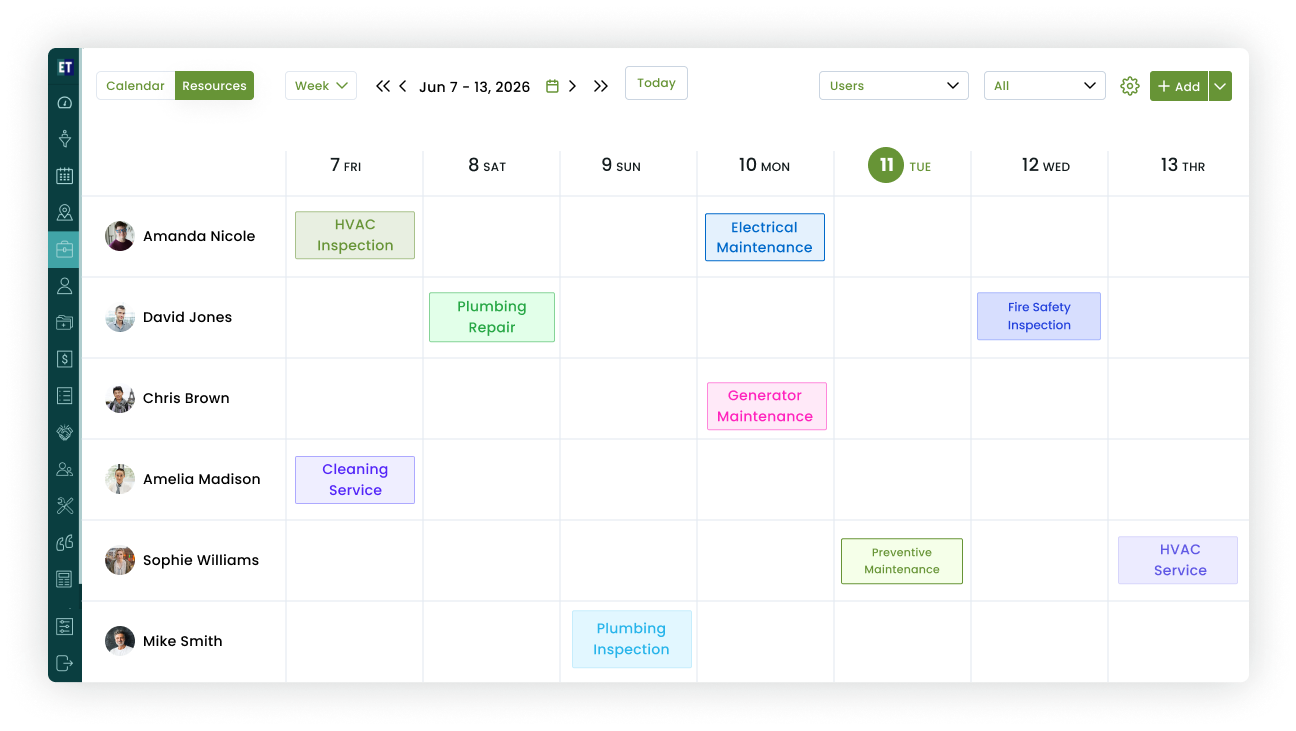
Dispatch to in-house technicians with priority levels and due times

Check mark

Status pills show raised → dispatched → in progress → completed at a glance

Check mark

Photos, notes and electronic signatures captured on completion
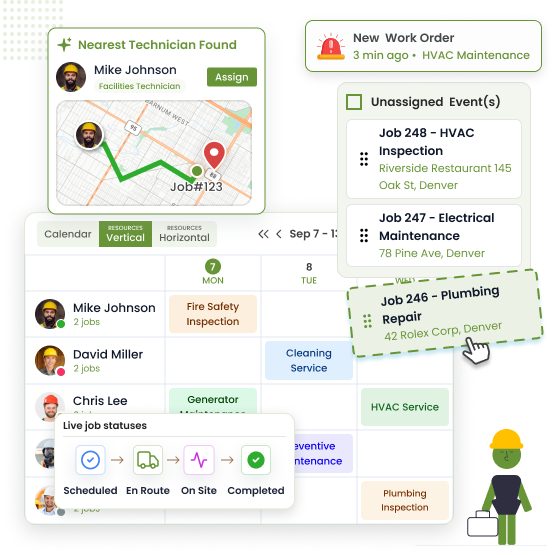
Facilities work order raised and assigned to technician
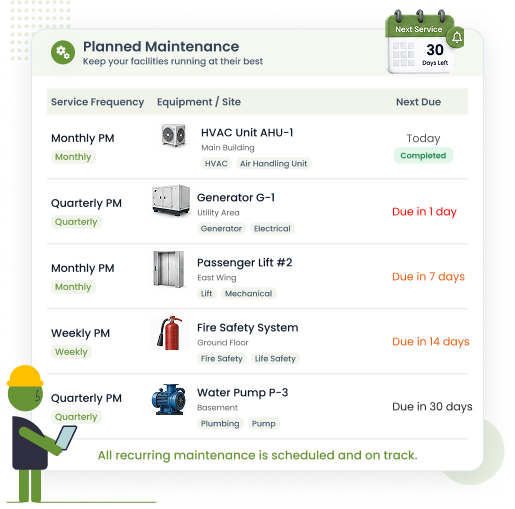
Planned preventive maintenance schedule for facility assets
Planned Maintenance

Facility Maintenance Management Software With PPM Built In

Planned preventive maintenance is what separates a facilities team from a firefighting team. Set the schedule once — weekly, monthly, quarterly, yearly — and EyeOnTask generates the jobs, assigns your technicians and logs every completed visit against the asset.
Check mark

Recurring schedules for HVAC plant, boilers, lifts, fire systems and more

Check mark

Jobs auto-created and dispatched — no one has to remember

Check mark

Overdue PPM flagged in red before it becomes a compliance problem

Check mark

Full PPM history ready for auditors and insurers

Asset Register

An Asset Register for Every Boiler, AHU and Fire Panel

When the breakdown call comes, the first questions are always the same: what model is it, is it under warranty, and who touched it last? Keep every asset's serial number, warranty status and complete service history one tap away — per building, per floor, per room.
Check mark

Equipment records with serial number, model, location and warranty dates

Check mark

Expired warranties flagged in red so repair-vs-replace calls are instant

Check mark

Activity timeline: every work order and PPM visit against the asset

Check mark

Repair spend history makes replacement budgeting evidence-based

Asset register with equipment serial numbers and warranty
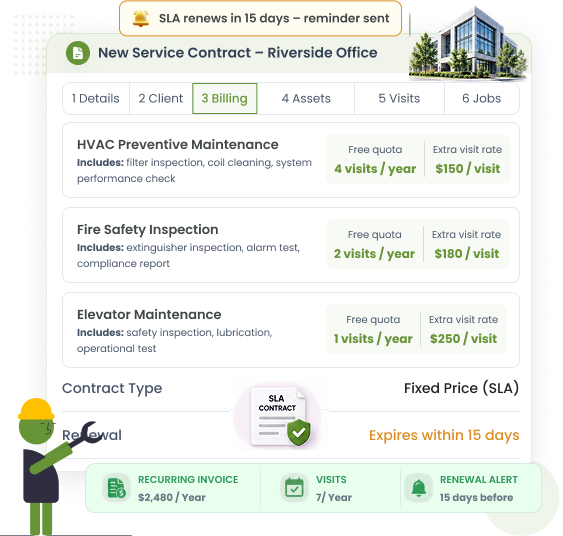
SLA contract with response time terms
Contracts & SLAs

SLA-Style Contracts With Response Times You Can Prove

Whether you answer to a leadership team or run FM as an internal service, response times are the number you're judged on. Build service contracts with defined visit schedules and response terms, and let the job history prove you hit them.
Check mark

Contract wizard: client, sites, covered assets, schedule, terms, renewal

Check mark

Response and resolution targets tracked per work order

Check mark

Renewals flagged before they lapse — no accidental coverage gaps

Check mark

Time-stamped job history is your SLA evidence, ready to export

Multi-Site Reports

Every Building You Run, on One Report

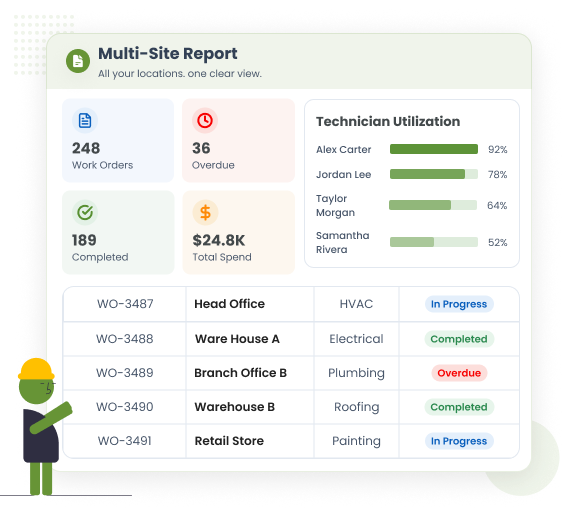
Head office, two warehouses and a branch across town — leadership doesn't want four spreadsheets, they want one answer. Filter jobs, spend and technician workload by site, or roll the whole portfolio into a single report.
Check mark

Per-site view of open, overdue and completed work orders

Check mark

Maintenance spend by building — see which site eats the budget

Check mark

Technician utilisation across locations for fair workload planning

Check mark

Export-ready reports for monthly leadership reviews

Multi-site facilities management report
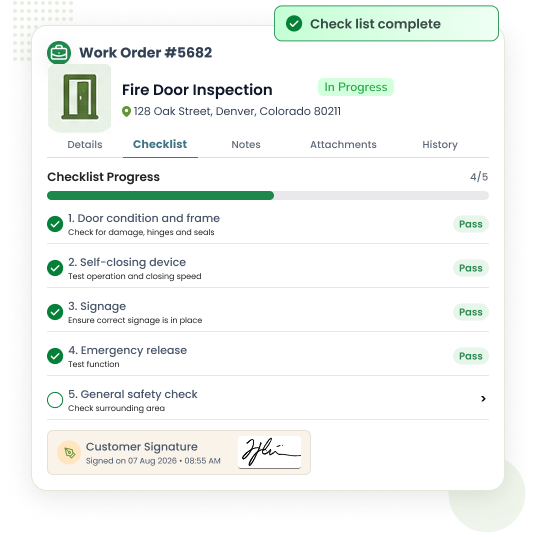
Compliance checklist completed on mobile with photo evidence
Audits & Checklists

Compliance Checklists Completed on Every Job

Statutory checks only count if they're recorded. Attach custom forms to any job — fire door inspections, water temperature checks, ladder audits — and technicians complete them on their phone with photos and a signature before the job can close.
Check mark

Build custom checklists per job type or asset class

Check mark

Photo evidence and electronic signature captured on site

Check mark

Works offline in basements and plant rooms — syncs when back in signal

Check mark

Completed forms stored against the asset for audit day

Why Teams Switch

The CAFM Software Small Businesses Can Actually Afford

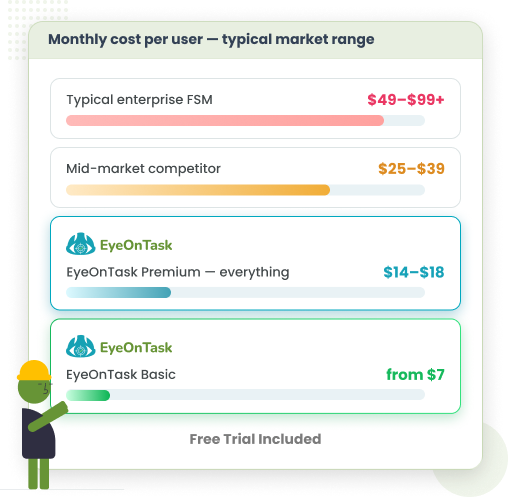
Enterprise CAFM suites quote per module, per site, per year — and bury the number behind a sales call. EyeOnTask starts at $7 per field user and $12 per admin per month, with Premium topping out at $18. Same core CAFM capability, without the enterprise invoice or the six-month rollout.
Check mark

Starts at $7/field user — Premium ceiling is $18, not $100+

Check mark

No per-module pricing, no per-site fees, no "contact sales" wall

Check mark

Set up in days, not a six-month CAFM implementation project

Check mark

See full plan details on our pricing page

Affordable facilities management software pricing
EyeOnTask mobile-app

Built to Work Where Technicians Work

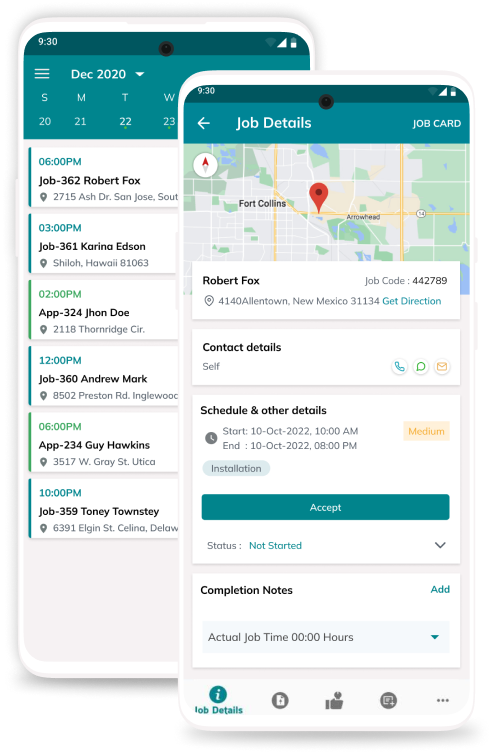
Plant rooms, basements, risers — signal-free zones are where facilities work happens. The EyeOnTask mobile app works fully offline: technicians see their jobs, complete checklists, capture photos and signatures, and everything syncs the moment they're back in coverage.
Check mark

Offline-first job list, forms and asset lookup

Check mark

Photo capture and electronic signatures on site

Check mark

Live status updates back to the FM office

Our Unmatchable Features

EyeOnTask for Facilities Management provides an all-in-one software toolkit. Get transparent pricing, unlimited sites, and all modules included—without mandatory sales calls. Streamline job scheduling, custom checklists, and assets today!

Starts at $7 Per Field User. Upgrade Only If You Need To.

One transparent price for the whole FM toolkit — no per-module fees, no per-site fees, no sales calls.
Free Trial Included

EyeOnTask for Facilities Management Software

$ 7 /user/month

Basic plan · $12 per admin user/month

  • Unlimited work orders, PPM schedules and sites
  • Asset register with full service history
  • Mobile app with offline mode for every technician
  • Contracts, checklists, reports and e-signatures
  • Advanced & Premium plans available when your team grows — compare plans

Manage whole process in just 4 simple steps.

  • Create a facilities management work order

    Create Job

  • Assign the job to a technician

    Assign to fieldworker

  • Raise an invoice

    Raise invoice

  • Get customer feedback

    Get feedback

Facilities Management software FAQs

What is the best facilities management software for a small business?

The best facilities management software for a small business covers work orders, planned preventive maintenance, asset registers, SLA contracts and multi-site reporting without enterprise CAFM pricing. EyeOnTask delivers all five in one system with a free trial and plans starting at $7 per field user per month, which is why small in-house FM teams choose it over heavyweight CAFM suites.

Is EyeOnTask a CAFM system?

EyeOnTask covers the core of what a CAFM (Computer-Aided Facilities Management) system does — reactive work orders, planned maintenance schedules, asset and equipment registers, contracts with response-time terms, and reporting across sites. It skips the enterprise modules most SMBs never use (space planning, BIM integration), which is how it stays affordable and quick to roll out for small facilities teams.

Can I manage work orders across multiple sites or buildings?

Yes. Every job in EyeOnTask is tied to a client location, so you can run separate buildings, branches or campuses side by side, dispatch technicians per site, and filter reports by location to see open work orders, completed jobs and spend for each building individually or across your whole portfolio.

Does EyeOnTask support planned preventive maintenance (PPM)?

Yes. You can set recurring maintenance schedules — weekly, monthly, quarterly or yearly — for assets like HVAC plant, boilers, fire panels and lifts. Jobs are generated automatically on schedule, assigned to your technicians, and every completed visit is logged against the asset's history, so nothing slips and audits are painless.

How much does facilities management software cost?

Enterprise CAFM systems commonly cost $40–$100+ per user per month. EyeOnTask starts at $7 per field user and $12 per admin per month on the Basic plan, with Advanced at $10 per field user / $15 per admin and Premium at $14 per field user / $18 per admin. Every plan includes a free trial with no credit card required.

What is the difference between facilities management software and property maintenance software?

Facilities management software is built for in-house FM teams maintaining the buildings their own organisation occupies — offices, plants, campuses — with PPM, asset registers and compliance at the centre. Property maintenance software targets contractors who service properties for landlords and letting agents, where quoting and invoicing external clients matters most. EyeOnTask offers both: this page covers in-house facilities teams, and our Property Maintenance Software page covers contractors.

Thanks for writing to us, we will try and get back to you as early as possible, if you have more question use the same form and send another email.
Contact EyeOnTask support
Contact Us
Reach out to our friendly team to learn more about EyeOnTask
Full Name*
Email*