

















Security & Alarm Software Loader

Security Installation Software for Alarm &
Access Control Companies

Install jobs on a spreadsheet, monitoring renewals in someone's head, and no record of which panel is
on which site — that's how monitoring revenue quietly leaks. EyeOnTask puts every install, every contract
and every device on one system your whole team can see.

No credit card   •   No setup fee   •   Cancel anytime

Best Field Management Software for your Security & Alarm business

We serve these big league companies
Job Scheduling & Dispatching

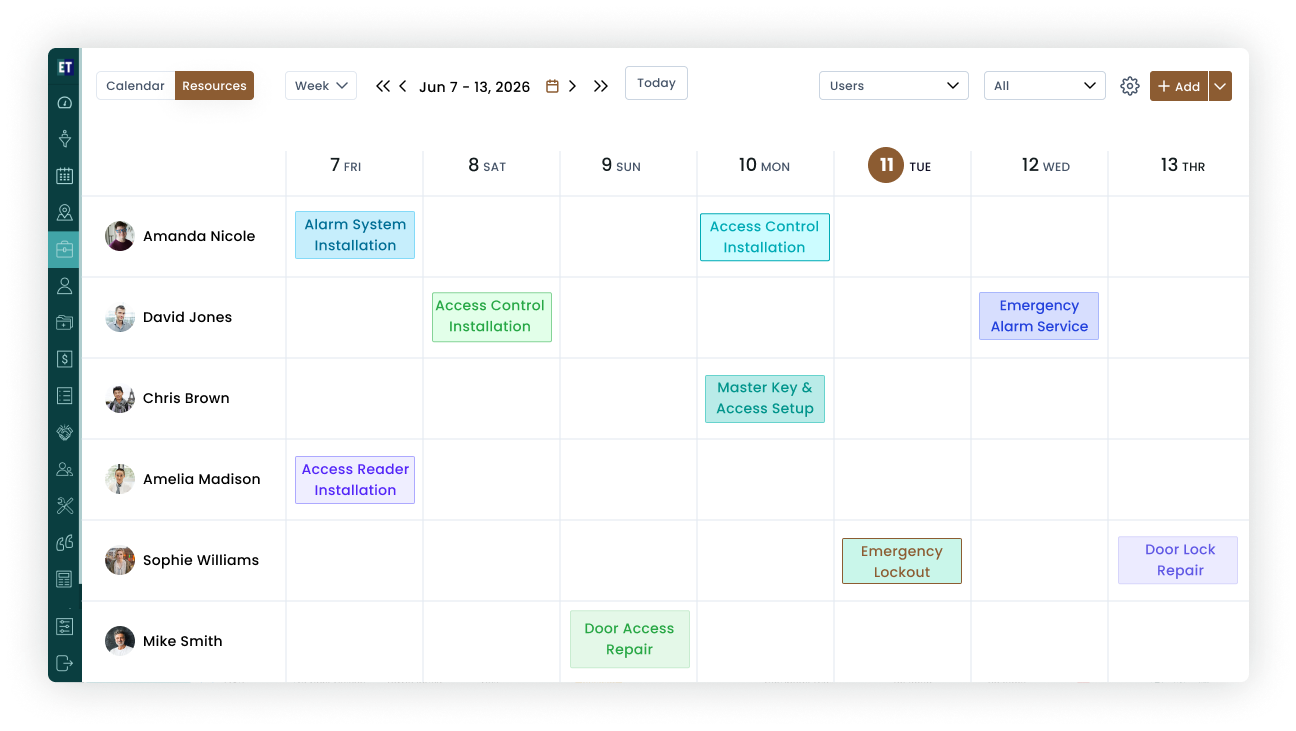
Alarm Company Software That Puts Every Install on One Board

New installs, callouts, takeovers and periodic inspections all land on the same dispatch board. Drag a job onto the right engineer, and the mobile app tells them where to go, what's on site and what to bring.

Week and month calendar views for install crews and service engineers.

Dispatch by skill and location — send the access-control-certified tech to the access control job.

Live job statuses: dispatched, in progress, commissioned, closed.
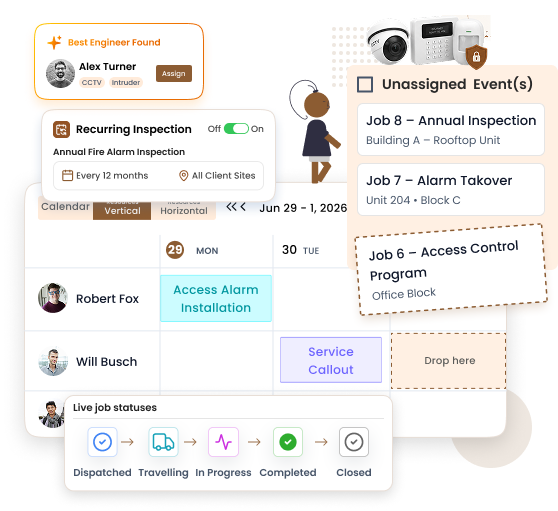
Recurring inspection visits auto-scheduled from the contract.

Job dispatch board
AMC contract management
Contracts (AMC)

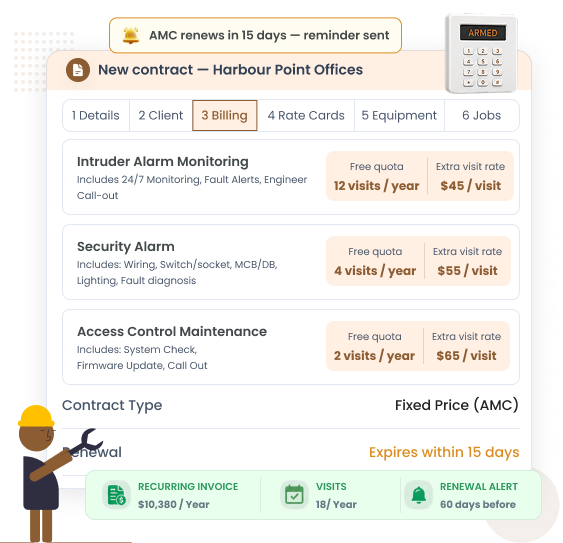
Recurring Monitoring Contracts That Renew, Not Lapse

Installation pays once; monitoring pays every month. EyeOnTask's contract module treats recurring revenue like the asset it is — cycles, scheduled visits and renewal reminders are all automatic.

Monthly, quarterly or annual billing cycles per contract.

Renewal alerts before expiry, so no client silently drops off monitoring.

Contracted inspection visits generated as jobs automatically.

Contract terms and documents attached to the client record.

Equipment & Asset Register

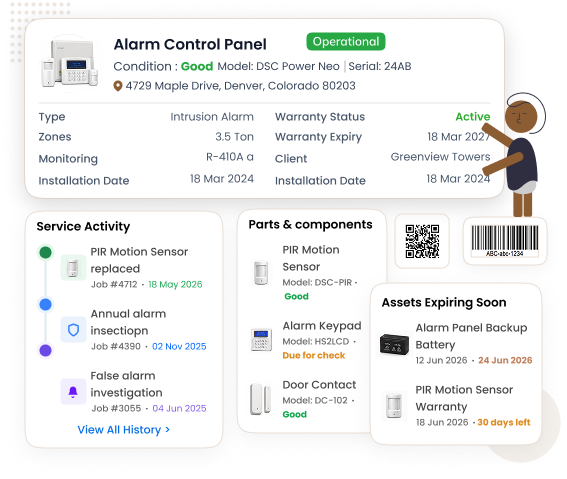
Every Panel, Sensor and Camera on Record — Per Site

Security system business software is only useful if it remembers what's installed where. Each site holds its own asset register with serials, models, zones and warranty status, so any engineer can walk in already knowing the system.

Panels, PIRs, door contacts, sirens, keypads, readers and cameras logged per site.

Serial number, model, install date and warranty — expired shows red before it bites.

Equipment activity timeline: who touched what, on which job, when.

Warranty-expiry view feeds your upgrade and replacement pipeline.

Equipment asset register
Audit and e-signature
Audit & Electronic Signature

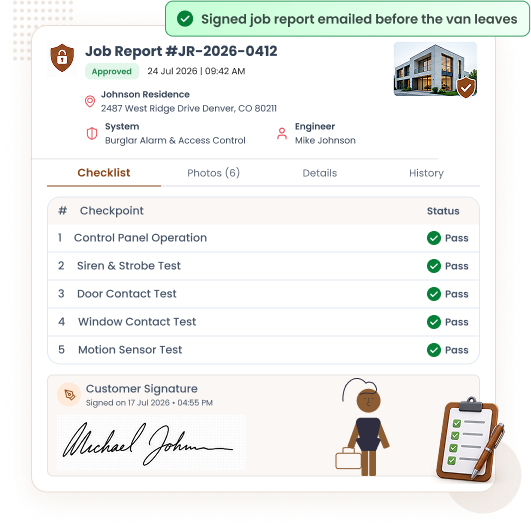
Compliance Forms and Signed Job Reports, Straight from Site

Insurers and commercial clients want proof, not promises. Build your commissioning and inspection checklists once, complete them on the phone, and hand over a signed report before the engineer leaves the premises.

Custom audit checklists for commissioning, takeovers and periodic inspections.

Electronic signature captured on site — no paper to lose.

Job report with checklist, photos and signature emailed to the client instantly.

Full audit trail per site for insurance and dispute protection.

Quotations / Estimations

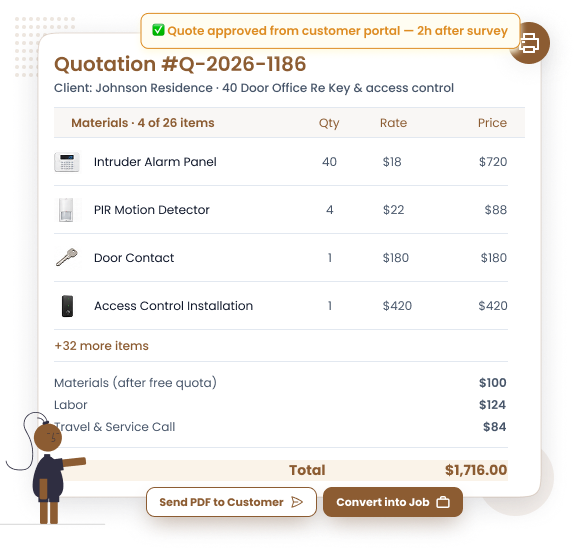
Access Control and Alarm Quotes in Minutes, Not Evenings

Alarm installation software should quote the way you sell: per device, per door, per camera. Rate cards keep your pricing consistent across every estimator, and the customer approves online from their portal.

Rate cards for panels, detectors, doors, readers and labour.

Quote from the phone during the site survey.

Customer approves or rejects online — status updates instantly.

Approved quote converts to a job in one tap.

Quotation and estimation
Invoicing and billing
Invoicing & Payment Collection

Invoice the Install, Bill the Monitoring, Get Paid on Site

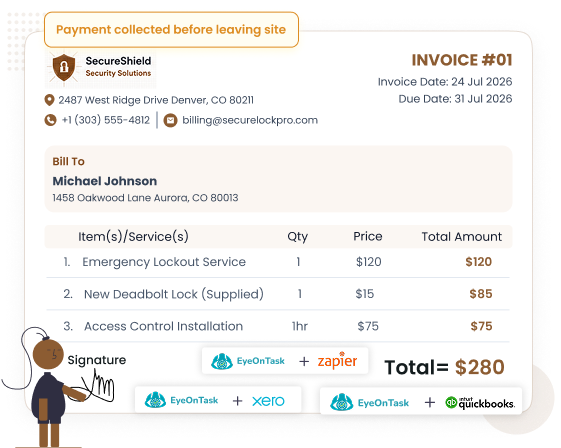
One-off installation charges and recurring monitoring fees live in the same billing flow. Raise the invoice from the job, capture a signature, take payment in the field, and let the accounting sync do the bookkeeping.

Invoice generated from the completed job — no retyping.

Card and online payment collection in the field.

Recurring invoices for monitoring and maintenance contracts.

QuickBooks, Xero, Stripe and PayPal integrations.

Client Call History & Service Tracking

One Service History for Every Security System You Install

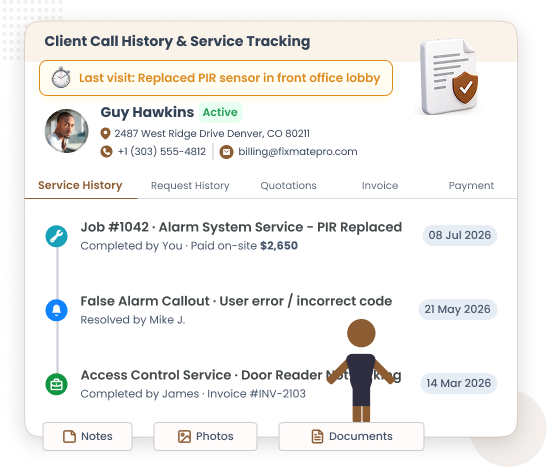
Mixed sites are normal in this trade — an intruder system here, two controlled doors there, cameras over the yard. Every call, visit and repair sits on one client timeline, so nobody asks the customer "what did we do last time?" If surveillance is your main line of work, our dedicated CCTV installation software page goes deeper.

Full call and visit history per client and per site.

False-alarm callouts logged with cause and resolution.

Site notes, zone maps and photos available to every engineer.

Repeat-issue patterns visible before they become cancellations.

Client call history
EyeOnTask mobile-app

Built to Work Where Security Engineers Work

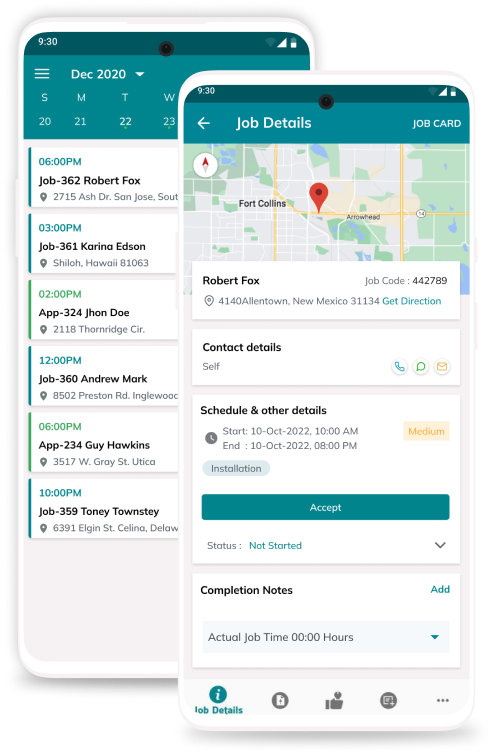
Plant rooms, basements, stairwells with zero signal — the EyeOnTask mobile app works offline and syncs when the network returns. Jobs, checklists, signatures and payments all run from the engineer's pocket.

Offline-first: capture everything with no coverage.

Job details, site register and history on the phone.

Photos, signatures and checklist completion in-app.

Our Unmatchable Features

Every tool a security system business needs — installs, monitoring contracts, assets and billing — in one place.

Starts at $7 per Field User. Upgrade Only If You Need To.

Most security installation software prices for enterprises. EyeOnTask prices for the company actually doing the installs.
Free Trial Included

EyeOnTask for Security & Alarm Business

$ 7 /user/month

per user, per month — everything unlocked

  • Jobs, scheduling, quotes and invoicing included
  • Contracts (AMC) for monitoring & maintenance
  • Per-site equipment register and service history
  • Mobile app with offline mode, unlimited jobs
  • Advanced & Premium plans available as your team grows — see full pricing

Manage whole process in just 4 simple steps.

  • Create Job Security & Alarm Software

    Create Job

  • Security & Alarm Software Fieldworker

    Assign to fieldworker

  • Security & Alarm Software Invoice

    Raise invoice

  • Security & Alarm Software Feedback

    Get feedback

Security & Alarm Installation Software FAQs

What is the best software for a security and alarm installation company?

The best security installation software combines job scheduling, recurring monitoring contracts, a per-site equipment register and on-site invoicing in one system. EyeOnTask covers all four for alarm, access control and CCTV companies, works offline on Android and iOS, and starts at $7 per field user per month with a free trial.

Can EyeOnTask manage recurring monitoring and maintenance contracts?

Yes. The Contracts (AMC) module handles recurring monitoring and maintenance agreements: set the billing cycle, auto-generate the scheduled service visits, and get renewal reminders before a contract expires so monitoring revenue never silently lapses.

Can I keep an equipment register of panels, sensors and cameras for each site?

Yes. Every customer site carries its own asset register — control panels, PIR sensors, door contacts, sirens, keypads and cameras — with serial number, model, install date and warranty status. Technicians see the full equipment activity history before they arrive.

Does EyeOnTask support compliance checklists and signed job reports?

Yes. Build audit checklists for commissioning and periodic inspections, complete them on the mobile app, capture the customer's electronic signature on site, and email the finished job report or certificate to the client before your engineer leaves.

How much does security installation software cost?

EyeOnTask has three plans: Basic at $7 per field user and $12 per admin per month, Advanced at $10 and $15, and Premium at $14 and $18. Every plan includes a free trial with no credit card and no setup fee.

Can I manage CCTV installation jobs with the same software?

Yes. Alarm, access control and CCTV work runs through the same jobs, contracts and equipment register, so mixed installations stay on one system. EyeOnTask also has a dedicated CCTV surveillance software page if surveillance is your main trade.

Thanks for writing to us, we will try and get back to you as early as possible, if you have more question use the same form and send another email.
EyeOnTask contact us
Contact Us
Reach out to our friendly team to learn more about EyeOnTask
Full Name*
Email*