Home Automation Software Loader

Home Automation Software Built for Smart Home Installers & Integrators

A smart home install is never one visit. Site survey, wiring, device mounting, hub programming, then the callback because a lock went offline. EyeOnTask keeps every visit, every device and every invoice for a home in one place, so your team stops chasing details across WhatsApp and spreadsheets.

No credit card   •   No setup fee   •   Cancel anytime

Best Field Management Software for your Home Automation Business

We serve these big league companies
Job Scheduling & Dispatching

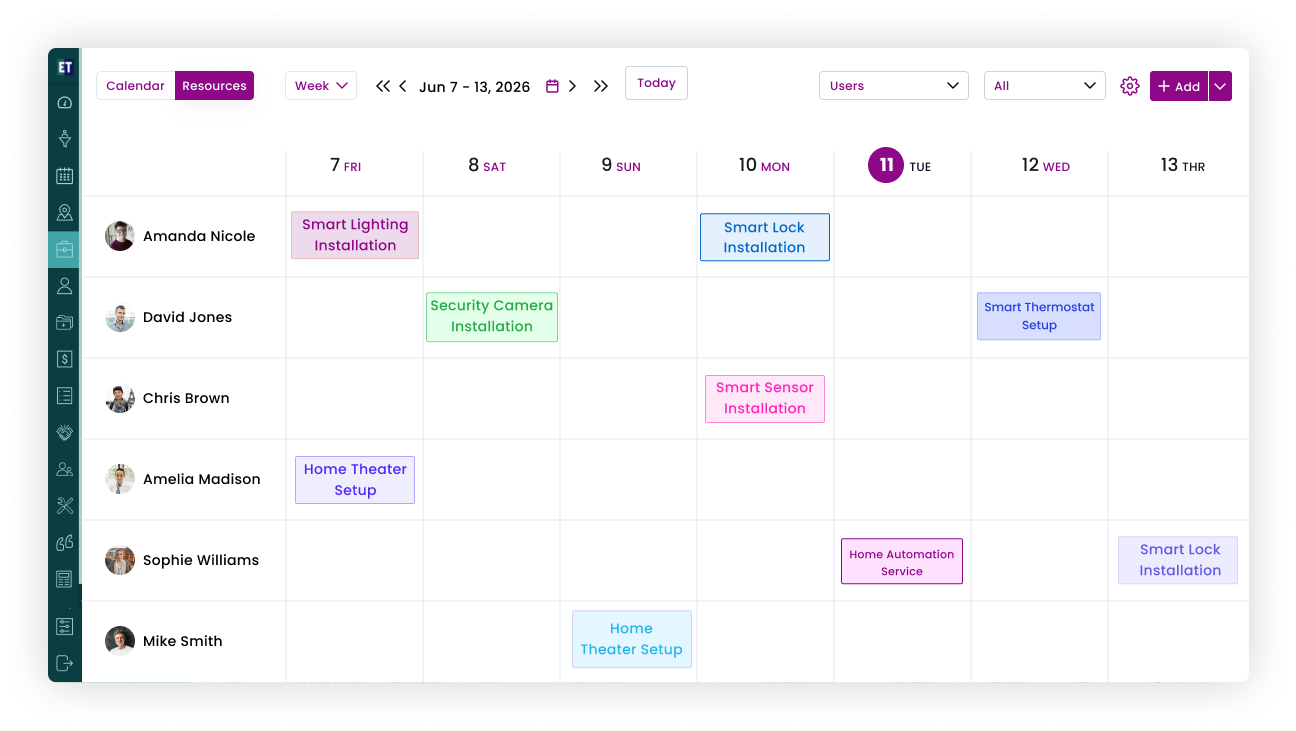
Plan multi-day installs, not just single visits

A full home install runs across survey, pre-wiring, device mounting and programming, often with different technicians on different days. EyeOnTask lets you schedule the whole sequence under one job, so the customer sees one project and your team sees who is due where.

Drag-and-drop week and month calendar with technician colour lanes.

Recurring visits and work patterns for builder projects with many units.

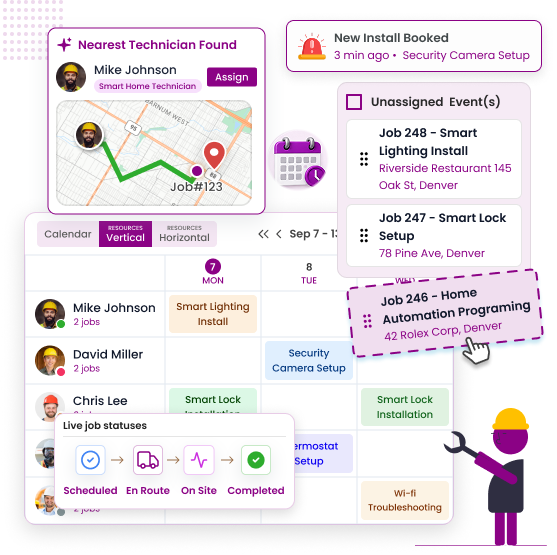
Dispatch the nearest free technician for offline-device callbacks.

Customer gets an SMS or email with the visit window and technician name.

Home Installation Scheduling
Home Automation Device Register
Equipment

A device register for every home you have wired

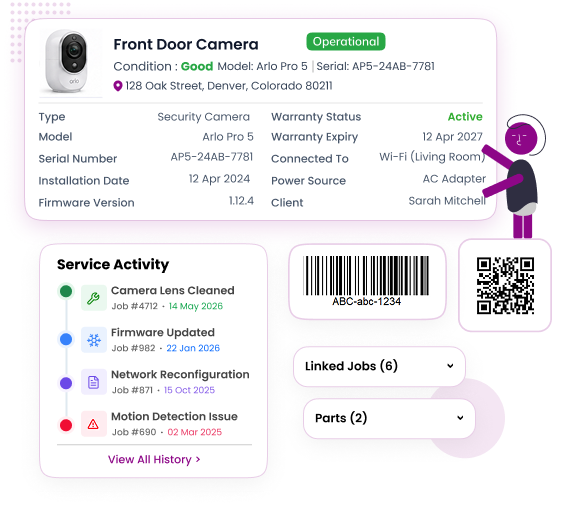
When a customer calls saying "the camera in the garage stopped recording", your technician should already know which model it is, when it went in and whether it is still under warranty. EyeOnTask stores every hub, camera, thermostat, lock and sensor against the customer's site.

Serial number, model, install date and warranty expiry per device.

Firmware version and network notes so remote troubleshooting starts faster.

Activity timeline shows every job ever done on that device.

Expired warranties flagged in red before you promise a free fix.

Quotations / Estimations

Quote a whole smart home in minutes, from the site

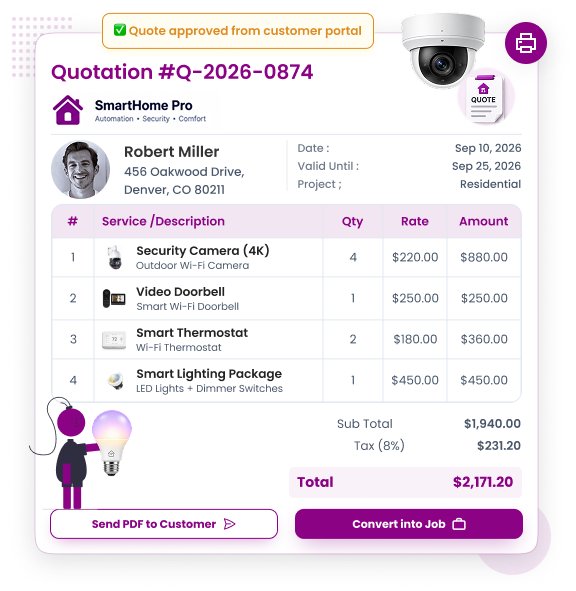
Room-by-room device counts, labour per point and a hub bundle add up fast. With rate cards and a product catalogue loaded, your surveyor builds the estimate on the phone while walking the house and sends it before leaving the driveway.

Rate cards for labour per point, per room or per device type.

Device bundles (starter hub, 4-camera pack) as single line items.

Customer approves the quote online through the Customer Portal.

Approved quote converts to a job and invoice with one click.

Smart Home Estimate
Home Maintenance Contract
Contracts (AMC)

Turn one-time installs into yearly maintenance revenue

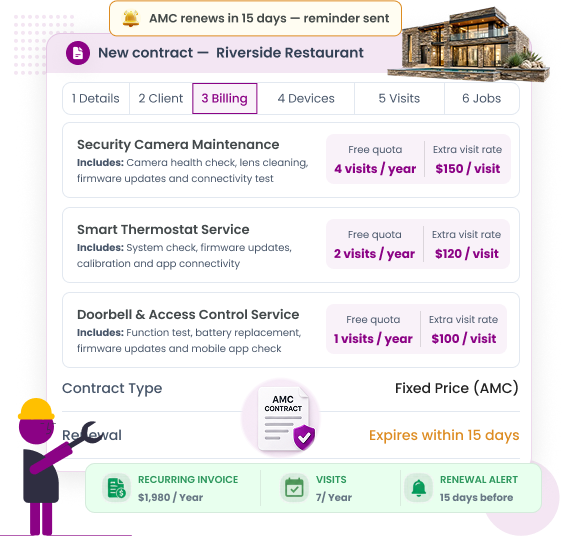
Smart homes need firmware updates, battery swaps and sensor checks. An annual maintenance contract keeps the customer covered and keeps your calendar full. EyeOnTask builds the contract, schedules the visits and reminds you before it expires.

6-step contract wizard: customer, covered devices, visits, value, dates, sign.

Scheduled maintenance visits created automatically for the contract period.

Renewal reminders 30 days before expiry, expired contracts shown in red.

Contract history visible on every linked job and invoice.

Inventory Management

Know which devices each technician is carrying before the visit starts

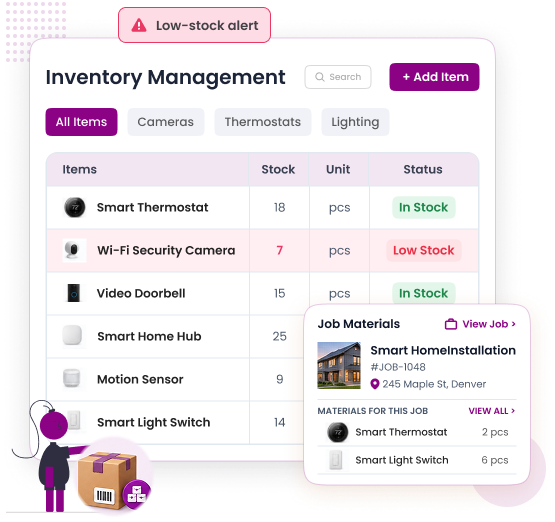
Nothing kills a day like reaching a site without the right relay module. EyeOnTask keeps your stock in one central inventory, lets you assign devices to a technician, move them between technicians or take them back, and warns you when a device is running low.

Central stock with low-stock alerts in red (Advanced plan add-on: assign inventory to users, move it between users, or return it to central stock).

Parts used on a job are deducted and added to the invoice automatically.

Scan a device QR or barcode to attach it to the job and the customer site.

Purchase history per device type for reorder planning.

Home Automation Inventory
Home Automation Invoicing
Invoicing & Payment Collection

Invoice at handover and collect while the customer is still smiling

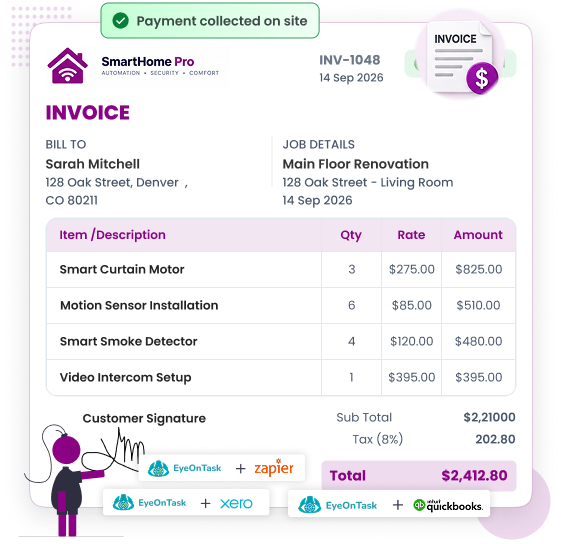
The best time to get paid for a smart home is the moment the lights respond to the app. The technician generates the invoice from the job, captures the customer's signature on the phone and takes card, ACH or link payment on the spot.

Job parts and labour flow into the invoice, no retyping.

Electronic signature on the technician's phone at handover.

Payment Collection on the Field via card, link or cash with receipt.

Syncs with QuickBooks, Xero, Stripe and PayPal.

Client Call History & Service Tracking

Every call, every fix, every home — remembered for you

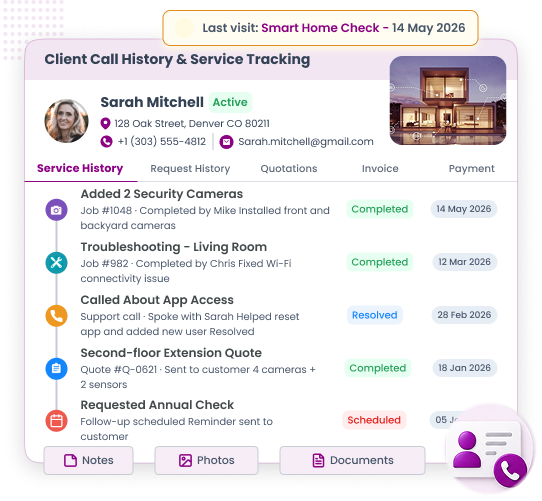
A customer who bought a hub two years ago will call for cameras, then for a second-floor extension, then for the annual check. EyeOnTask keeps that whole relationship in one record so any admin can pick up the phone and sound like they were there.

Call log with reason, outcome and follow-up date per customer.

Job, quote, invoice and contract history on one customer screen.

Lead Management for survey requests that have not become jobs yet.

Customer feedback captured after every visit.

Home Automation Service History
EyeOnTask mobile-app

Built to work where technicians work — in the plant room, not the office

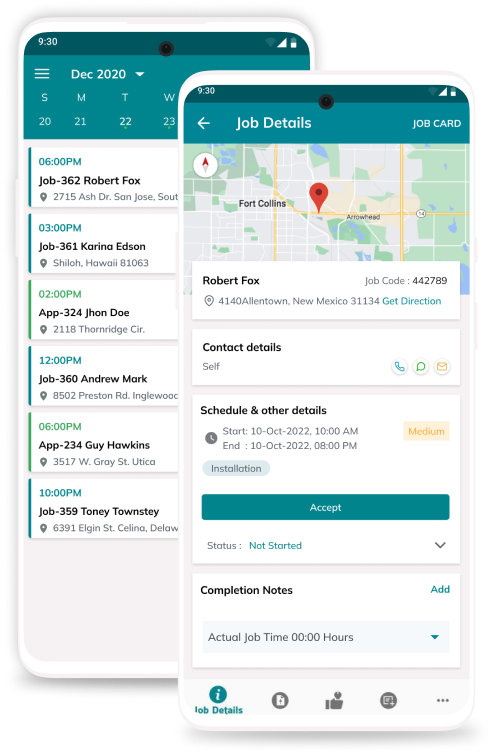
New-build installs rarely have Wi-Fi on day one and basements kill mobile signal. The EyeOnTask technician app stores the job, checklist, photos, device scans, signature and time log on the phone, then syncs everything the moment a signal returns.

Today's jobs with route, customer notes and site device list.

Room-by-room install checklist with photo proof.

Job Time Tracker for labour billing.

Multi Language Support for mixed teams.

Our Unmatchable Features

Unified home automation management: One intuitive dashboard for office operations, and a powerful mobile app for field technicians.

Starts at $7 Per Field User. Upgrade Only If You Need To.

Pay per person, not per home. A two-technician integrator runs the whole business for less than one smart bulb a month per user.
Free Trial Included

EyeOnTask for Home Automation Software

$ 7 /user/month

+ $12 per admin user/month · Basic plan

  • Job scheduling, dispatching and technician mobile app
  • Quotes, invoices, e-signature and on-site payment
  • Equipment register and client call history
  • No credit card, no setup fee, cancel anytime
  • Advanced & Premium plans available when your team grows — compare plans

Manage whole process in just 4 simple steps.

  • Create a smart home install job

    Create Job

  • Technician assigned to a smart home install job

    Assign to fieldworker

  • Invoice raised at handover

    Raise invoice

  • Customer feedback after the visit

    Get feedback

Home Automation Software FAQs

What is home automation business software?

Home automation business software helps smart home installers and integrators run the service side of the business: scheduling site surveys and multi-day installs, dispatching technicians, keeping a device register for every home, sending quotes, managing annual maintenance contracts, tracking inventory and invoicing on-site. EyeOnTask does all of this in one web dashboard plus a technician mobile app.

Can I track every smart device installed at a customer's home?

Yes. EyeOnTask keeps an Equipment register per customer site. Each hub, camera, thermostat, smart lock or panel is saved with its serial number, model, install date, warranty expiry and firmware note. Every later job on that device is logged in the activity timeline, so any technician can see the full history before visiting.

Does EyeOnTask handle annual maintenance contracts for smart homes?

Yes. The Contracts (AMC) module lets you create a maintenance contract per home with covered devices, visit frequency, contract value and validity dates. Scheduled visits are generated automatically, renewal reminders go out before expiry, and expired contracts are flagged in red so nothing slips.

Can technicians use the app offline in a house with no Wi-Fi yet?

Yes. The EyeOnTask technician app is built to work offline. Job details, checklists, photos, signatures and time logs are saved on the phone and synced automatically once the technician is back on a mobile signal or Wi-Fi, which is common on new-build installs where the network is not live yet.

How much does home automation software cost?

EyeOnTask starts at $7 per field user and $12 per admin user per month on the Basic plan. The Advanced plan is $10 per field user and $15 per admin, and the Premium plan is $14 per field user and $18 per admin. Every plan includes a free trial with no credit card and no setup fee, and you can cancel anytime.

Thanks for writing to us, we will try and get back to you as early as possible, if you have more question use the same form and send another email.
Contact EyeOnTask support
Contact Us
Reach out to our friendly team to learn more about EyeOnTask
Full Name*
Email*